learn
/
methodology
How to connect Claude or ChatGPT to Meta Ads, for free
Connect Claude or ChatGPT to your Meta Ads account in about 10 minutes with Windsor.ai or Zernio, both free to start. Step by step, with a test prompt.
By Gabriele Franco, co-founder of Cassandra


Get one practical idea every week to grow with the same team
To connect Claude or ChatGPT to Meta Ads, link your ad account to Windsor.ai at onboard.windsor.ai, then install the Windsor.ai connector in Claude or ChatGPT from the same page. It's free for 30 days and then free for one ad account, and with Write actions switched off the AI can read your campaigns but not change them.
Exporting a CSV from Ads Manager every time you want to ask Claude something gets old fast. If you connect the ad account once, you can just ask "which campaigns wasted money last week?" and Claude reads the live numbers. It takes about 10 minutes.
Claude and ChatGPT can't log in to Meta by themselves, so you need a connector in between. We use Windsor.ai here because it works in both Claude and ChatGPT and you can start for free. Zernio is a second free option if you only use Claude.

What do you need to connect Claude to Meta Ads?
A Claude or ChatGPT account.
Access to the Meta ad account itself, not only the Facebook Page.
A Windsor.ai account. You create it in step 2, no card needed.
Is Windsor.ai free?
Windsor's free trial lasts 30 days and covers up to 10 sources. After that, the free plan keeps one source and one account, and only reads the last 30 days. Zernio is free for two connected accounts, and the ad account counts as one of them. Zernio's ad tools work in Claude but not in ChatGPT.
How to connect Claude or ChatGPT to Meta Ads, step by step
1. Open Windsor
Go to onboard.windsor.ai, type Facebook Ads in Type platform name and click it. Instagram ads are included in the same connector.
2. Give Windsor access to your ad account
Click Grant Facebook Ads Access, log in to Facebook and approve what Meta asks for. Windsor creates your account at this point. Back in Windsor, tick your ad account under Select Facebook Accounts and click Next >.
3. Pick Claude or ChatGPT
You land on 2. Preview and Destination with a preview of your campaigns. You don't need to tick any fields, because Claude and ChatGPT can read all of them. Scroll down to Data Destinations, click the AI filter and choose Claude or ChatGPT.
4. Turn off Write actions, then install
On the card that opens, switch Write actions off. That way the AI can read your account but can't pause campaigns or touch budgets. You can turn it back on later.
Then click Install Windsor.ai connector. It opens Claude or ChatGPT on the Windsor page. In Claude, click Add. In ChatGPT, click Connect and then Allow Access. Sign in with the Windsor account you just made.
On Claude Team and Enterprise plans only an Owner can add connectors, so you may need to ask yours first.
5. Turn it on in a chat
In Claude, open a new chat, click + at the bottom left, go to Connectors and switch Windsor.ai on.
In ChatGPT, type @ and pick Windsor. ChatGPT only uses it for that one message, so add it each time.
How do you check the connection works?
Paste this:
You should get a table with your campaign names and last week's spend. Open Ads Manager on the same 7 days and compare the total spend: it should match to the cent. Purchases can be a bit off if the attribution setting is different.
Can Claude or ChatGPT change your Meta Ads campaigns?
All of these tools can read your campaigns, spend and results. Most of them can also make changes, and some have that switched on by default.
Tool | What it can change in Meta Ads | How to make it read-only |
|---|---|---|
Windsor.ai | Create campaigns, ad sets and ads (they start paused), pause or turn them on, change campaign and ad set budgets, edit targeting and creative. At most 4 budget changes per ad set per hour. | Switch Write actions off on the Claude or ChatGPT card. New accounts have it on by default. |
Zernio | Pause, resume and change budgets, edit targeting, creative and bid strategy, delete or duplicate campaigns. | Its Claude connection always has full access for now. For read-only you need an API key with read permission (works in Claude Code), or a Zernio user with the Viewer role. |
Create and edit campaigns, ad sets and ads (they start paused). | In Meta Business Suite go to Settings, then Ads MCP server under Integrations, pick the ad account and set Create campaigns and Edit or set budget to Blocked. |
You can also limit things inside Claude and ChatGPT.
In Claude, go to Customize > Connectors, click Windsor.ai and open Tool permissions. Every tool can be set to Always allow, Needs approval or Blocked. Set the ones that change things to Blocked if you only want reports, or to Needs approval if you want to approve each change with Allow once. Don't use Always allow on those. On Team and Enterprise, an Owner can set limits nobody else can override.
In ChatGPT, go to Settings > Plugins > Permissions (some accounts still say Apps) and pick Always ask or Allow read actions. ChatGPT shows a card before any change. Read what it's about to do, then click Allow once or Deny. On Business and Enterprise, admins can switch off Write actions for the whole workspace.
In Claude Code, you're asked before each tool runs. To block Windsor's change tool completely, put this in .claude/settings.json:
Replace windsor with the name you used in claude mcp add. A deny rule always beats an allow rule.
How do you stop an AI agent from changing your Meta Ads budget?
Don't rely on a single setting. We use all of these together:
Connect with a login that can only look. In your business portfolio, give the person who connects Windsor just View performance on the ad account (Settings > People). Whatever the connector does, it acts as that person, so it can read reports but can't edit anything. Windsor recommends this too.
Switch off writes in the connector. Windsor: Write actions off. Meta's connector: Edit or set budget on Blocked, or a ceiling in Budgets set above this amount.
Keep approvals on in Claude or ChatGPT, as described above.
Write it in the prompt, for example "read only, don't change budgets, bids, status or targeting". Useful as a reminder, but the AI can still make mistakes, so keep the other locks.
Cap spend in Meta. Payment settings > Account spending limit pauses your ads once the limit is reached. Each campaign can also have a Campaign spending limit.
Look at what changed. In Ads Manager, select a campaign and open Activity history to see what changed, when and by whom. There's no undo button, so you change it back yourself. To cut a connector off completely, go to Settings > Business Integrations and click Remove.
Can you use Zernio instead of Windsor.ai?
In Claude, click + in the message box, then Connectors > Add connector > Add custom connector.
Name it
Zernio, pastehttps://mcp.zernio.com/mcpas the URL and click Continue.Leave Sign in now and Register automatically as they are, click Add, then Authorize.
In the Zernio dashboard, open Connections and click + Connect on the Meta Ads card. Log in to Facebook and pick your account with Add ad accounts. The card turns to connected.
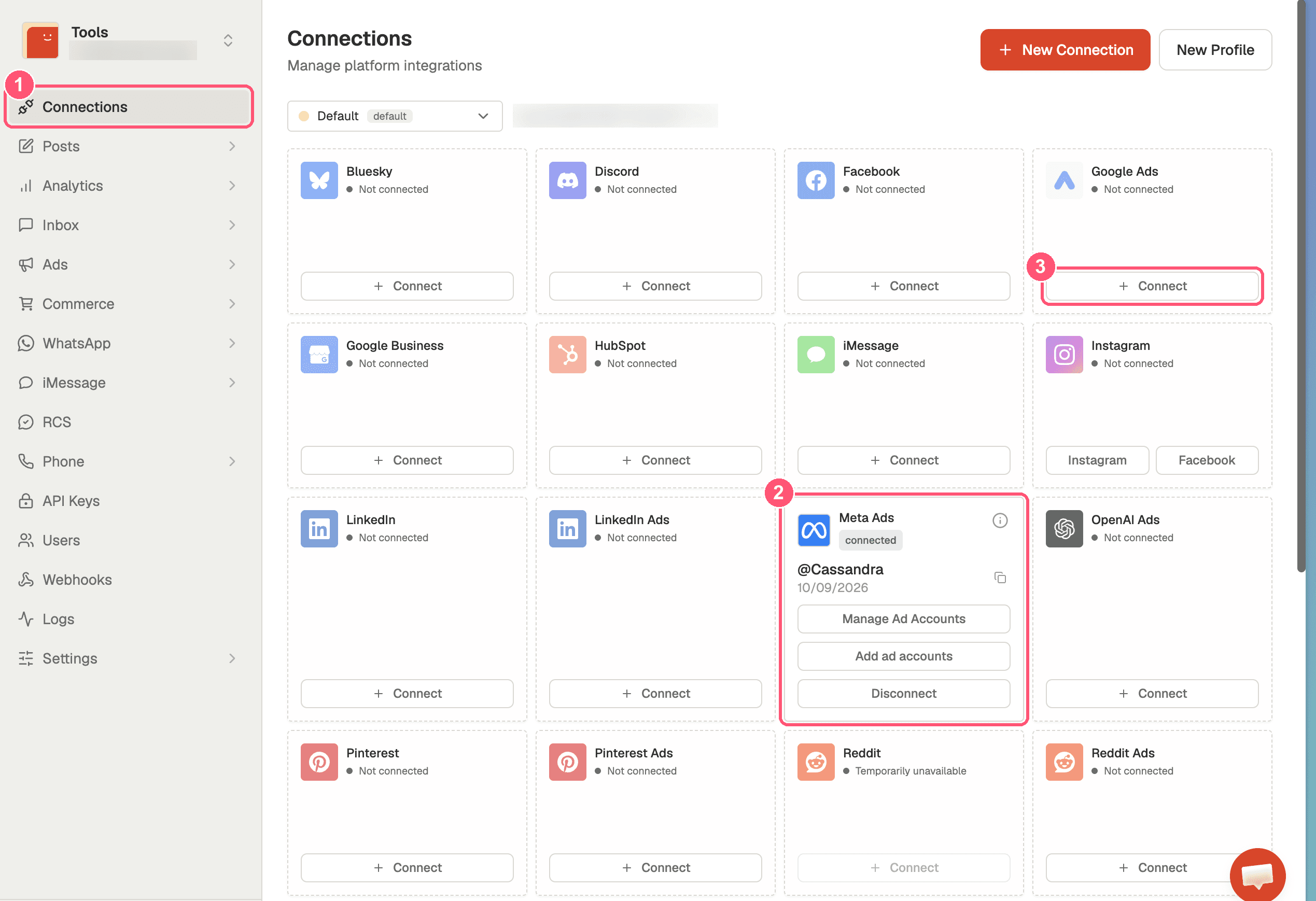
Claude signs in to Zernio for you, so you don't need a key. If another tool asks for one, open API Keys and click + Create key. Give each key only the permission it needs and never paste it into a chat.

On the free Claude plan you can add only one custom connector.
Meta also has its own connector for AI assistants, in open beta since April 2026. It can create and edit ads, so set its rules (see the table above) before you use it.
What if Claude or ChatGPT can't see your Meta Ads data?
What you see | Why | Fix |
|---|---|---|
Claude answers without data | The connector is off in this chat | + > Connectors > switch Windsor on |
"No accounts found" | Your Facebook profile has no access to the ad account | Ask the Business Manager admin to add you to the ad account, then repeat step 2 |
Nothing older than 30 days | Free plan limit | Ask about the last 30 days, or upgrade |
Purchases differ from Ads Manager | Different attribution window or time zone | Ask Claude to use the same attribution setting as Ads Manager |
You can't add the connector (Team plan) | Only Owners can | Ask an Owner |
Marketing decisions should not rely on one data source
Ads Manager only tells you what Meta saw. Before moving budget, you'd also want to know what customers say in reviews, which products sell and at what margin, what your analytics shows across channels and what past tests proved. A quick way to get closer: connect Google Ads and Google Analytics 4 too, and ask Claude what else it would need before it recommends anything. More on this in what is a marketing brain.
That's what we built Cassandra for. It pulls your ad accounts, analytics, sales, products, reviews and incrementality tests into one place, works out what to do next, and makes the changes in your ad accounts within the rules your team sets. You can start for free with your website and data.
Next
Menus and plans checked on 22 October 2026. If a label has changed, look for the closest match.