PRODUCT UPDATES
Introducing the new Budget Allocation That Knows When to Spend
Introducing the new budget allocation in Cassandra, which knows when to spend and plans budgets to your growth target.


Most MMMs Tell You Where. Not When.
The classic Marketing Mix Model output is a channel split: put 40% in Meta, 30% in Google, 20% in TV, 10% in TikTok. That is useful. But it ignores something every marketer already knows: demand is not flat. Consumer intent peaks at different times of year. Audiences are more receptive in some weeks than others.
A flat allocation treats every week as identical. In practice, that means:
Overspending in low-demand periods, buying reach when nobody is buying.
Underspending in peak weeks, while competitors show up more where it matters.
Losing revenue from poor timing, spending too late to catch peak conversions.
The "where to invest" question and the "when to invest" question cannot be answered separately. Answering only one of them costs real revenue.
Cassandra Now Answers Both Questions at Once
Your MMM has already learned when demand peaks in your market — which weeks customers actually buy. The Budget Allocator reads those patterns and loads your spend into the right weeks, while keeping every channel active even in slow periods. Then it finds the channel split that maximizes predicted revenue across your full planning horizon.
Now your Optimal Media Plan is ready.
With standard media plan: "Put $500k into Meta this quarter."
With Cassandra Optimal plan: "Put $28k into Meta in week 1, $41k in week 6, $35k in week 10..." — because your model says demand peaks in week 6.
Run it now, then export a CSV you can hand straight to your team.

Diminishing Returns: Where to Spend More (and Less)
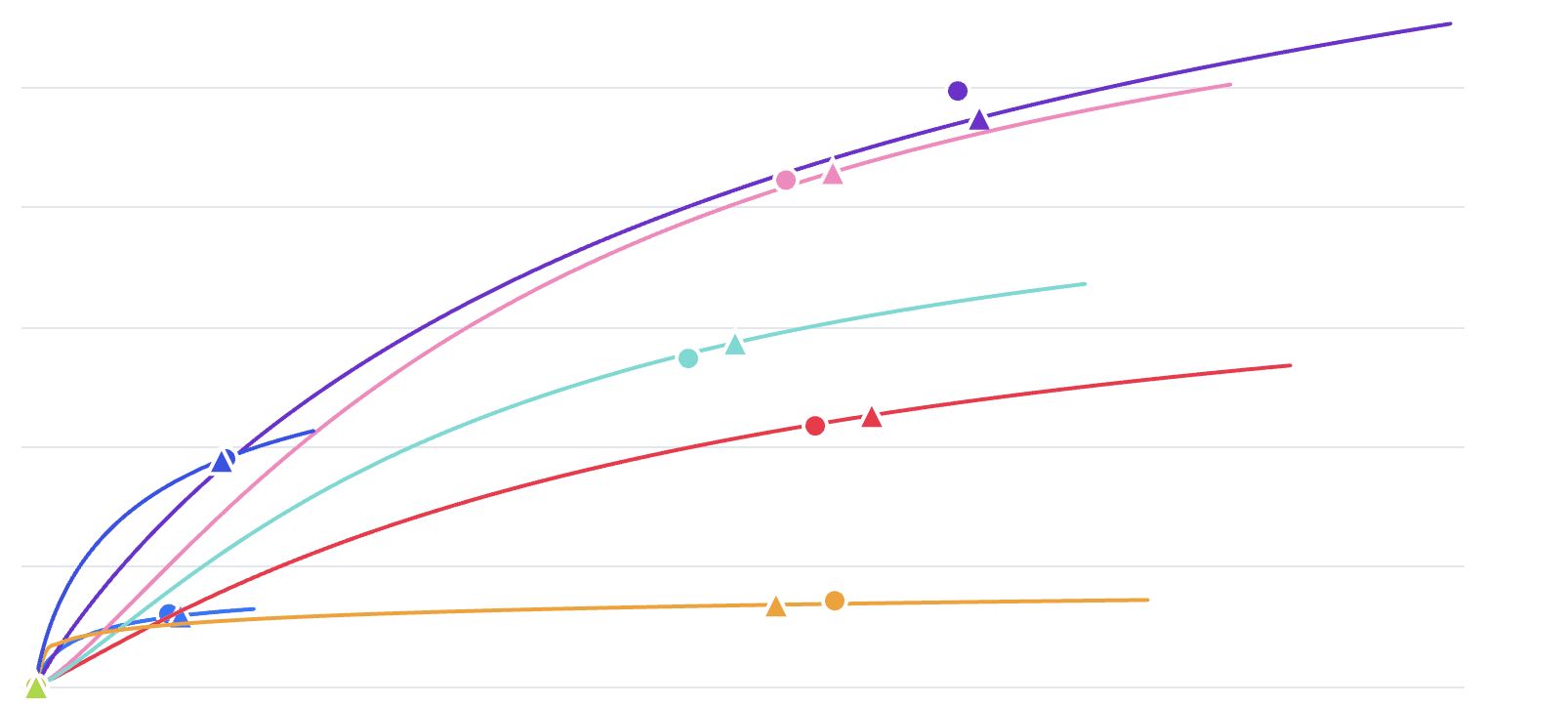
Switch to the diminishing returns view to see every channel's current spend vs. Cassandra's suggestion. Channels with a large gap between the two are your biggest reallocation opportunities. Move budget away from saturated channels and toward those still on the steep part of their response curve.
BAU vs. Optimized: See the Impact
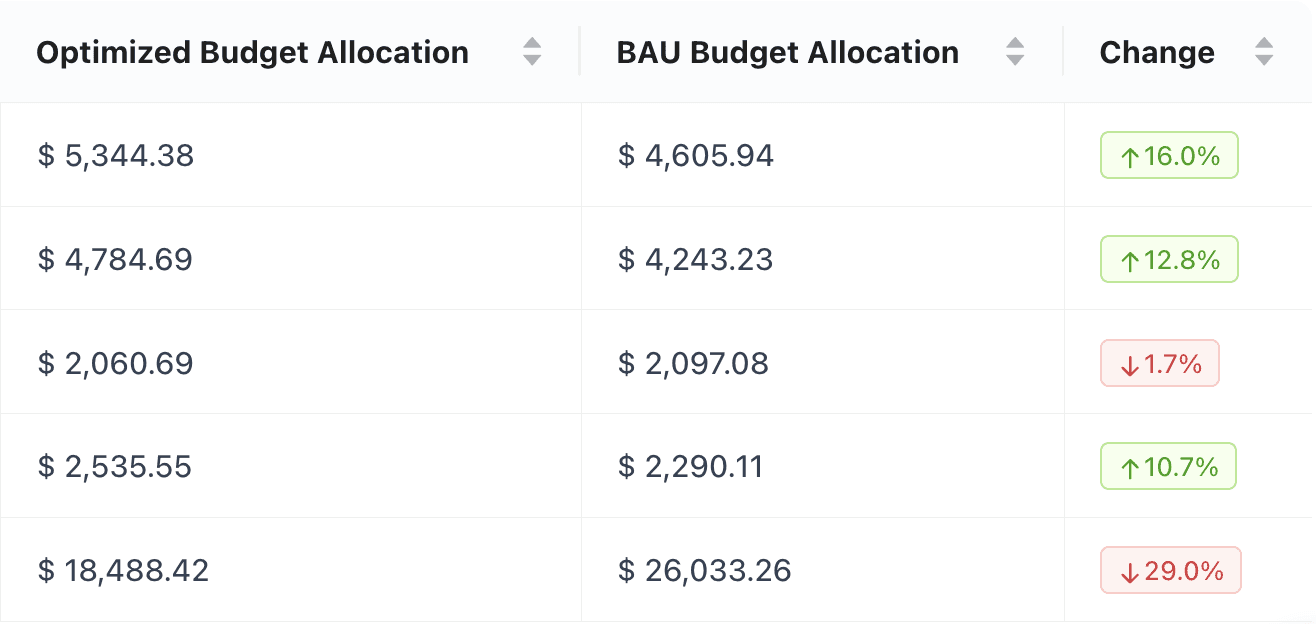
BAU (Business as Usual) is what happens if you keep spending as you do today. The Optimized column is Cassandra's recommendation to maximize your return on the same total budget. Compare them side by side to see exactly where to shift spend for the biggest impact.
How to Use the Budget Allocator
Set your planning horizon and total budget. Define the start date, end date, and total budget. The allocator adapts to weekly, monthly, or daily model frequencies automatically.
Define your channel constraints. By default, no channel moves more than 30% from its historical spending pattern. You can tighten or loosen this per channel.
Run the allocation. The optimizer returns the week-by-channel spend matrix, predicted revenues with confidence intervals, and a constraint report.
Export and act. Download the week-by-week CSV and hand it to your media buying team. The confidence intervals give you a defensible revenue range to quote in your board deck.Why This Matters for Your Business
Why This Matters for Your Daily Work
You stop leaving revenue on the table. Concentrating spend in high-demand weeks means each euro converts more efficiently. Your model already knows when those weeks are.
You stop buying reach when nobody is buying. Reducing spend in flat, low-demand periods frees budget to deploy at peak, where the same spend generates more incremental revenue.
You get a defensible plan, not a gut feel. The output is derived directly from your MMM. The timing recommendations are tied to real seasonality learned from years of historical data.
You run one analysis instead of three. No more reconciling channel attribution, seasonality analysis, and a spreadsheet. The Budget Allocator does all three in one step.